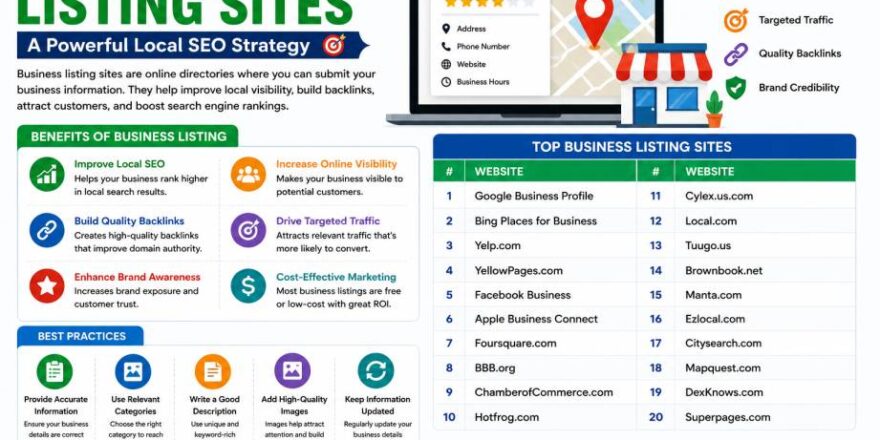

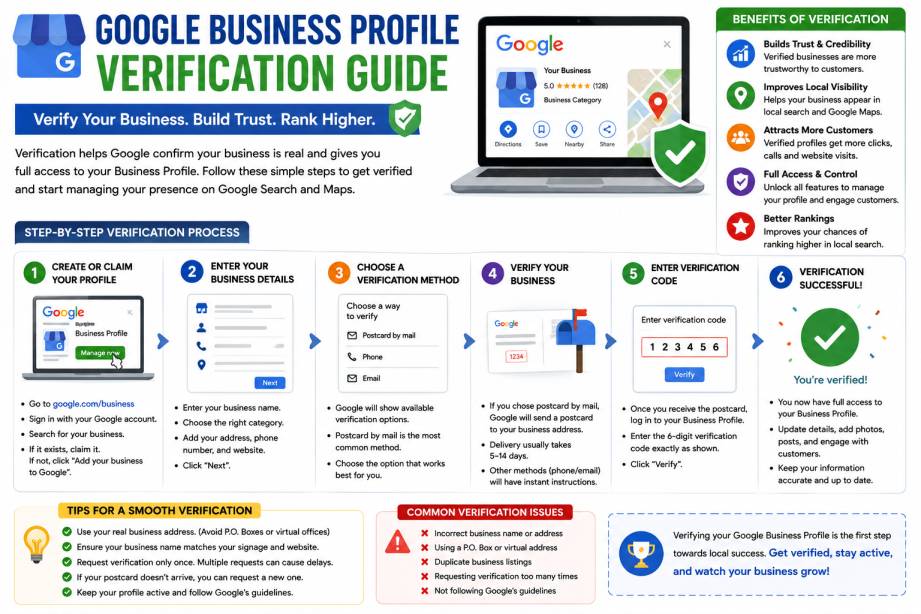
Getting your business listed on Google is one of the most effective ways to attract local customers. However, simply creating a Google Business Profile isn’t enough. To unlock all features and appear prominently in Google Search and Google Maps, you must complete the verification process.
Many business owners struggle with verification because Google now offers several methods, including phone, email, postcard, video verification, and live video calls. If you’re unsure which method to choose or what to do when verification fails, this guide will walk you through everything you need to know.
Table of Contents
- What Is Google Business Profile Verification?
- Why Verification Matters
- Benefits of a Verified Google Business Profile
- Google Business Profile Verification Methods
- How to Verify Your Business Step by Step
- Common Verification Problems and Solutions
- How Long Verification Takes
- What to Do After Verification
- Google Business Profile Optimization Tips
- Frequently Asked Questions
- Conclusion
What Is Google Business Profile Verification?
Google Business Profile verification is the process Google uses to confirm that your business is legitimate and that you are authorized to manage the listing.
Without verification, your profile may have limited visibility and you won’t have full control over important features such as:
- Business information updates
- Reviews management
- Posts and updates
- Photos and videos
- Messaging features
- Insights and analytics
Verification helps Google maintain accurate information while protecting users from fake or misleading business listings.
Why Verification Is Important
Google wants to provide reliable local search results. Verification ensures that only genuine business owners can manage business profiles.
When your profile is verified:
- Customers trust your business more
- Your listing becomes more visible in local searches
- You can appear on Google Maps
- You gain access to profile management tools
- You can collect and respond to reviews
For local businesses, verification is often the first step toward improving local SEO performance.
Benefits of a Verified Google Business Profile
Better Local Search Visibility
Verified businesses have a greater chance of appearing in local search results and Google Maps.
Increased Customer Trust
A complete and verified profile gives customers confidence that your business is genuine.
More Calls and Website Visits
Customers can easily contact your business directly through your profile.
Higher Engagement
Verified listings can receive reviews, questions, and interactions that help improve credibility.
Improved Local SEO
Google uses verified business information as a trust signal when determining local rankings.
Google Business Profile Verification Methods
Google determines which verification options are available based on your industry, location, and business type.
1. Phone Verification
If eligible, Google sends a verification code through:
- SMS
- Automated phone call
This is one of the fastest verification methods.
Steps:
- Select phone verification.
- Receive the code.
- Enter the code in your profile.
- Complete verification.
2. Email Verification
Some businesses qualify for email verification.
Process:
- Choose email verification.
- Open the verification email.
- Enter the code or click the verification link.
- Confirm ownership.
Email verification is usually completed within minutes.
3. Postcard Verification
Postcard verification remains common for physical businesses such as:
- Restaurants
- Clinics
- Retail stores
- Salons
- Offices
How It Works
Google sends a postcard containing a unique verification code to your business address.
Important Tips
- Verify your address before requesting the postcard.
- Do not edit business details while waiting.
- Check mail regularly.
Most postcards arrive within 5–14 days.
4. Video Verification
Video verification has become increasingly common in recent years.
Google asks business owners to record a short video showing:
- Business signage
- Physical location
- Equipment or workspace
- Proof of business operations
Tips for Approval
- Record during daylight when possible.
- Show your storefront clearly.
- Include business tools or equipment.
- Keep the video steady and clear.
Review usually takes between one and five business days.
5. Live Video Call Verification
For some businesses, Google may require a live video call.
During the call, a Google representative may ask you to:
- Show your storefront
- Display business documents
- Demonstrate access to the location
- Confirm business details
This method helps Google verify higher-risk listings.
Step-by-Step Guide to Verify Your Business
Step 1: Create or Claim Your Business Profile
Visit the Google Business Profile dashboard and sign in using your Google account.
Enter:
- Business name
- Category
- Address
- Phone number
- Website URL
Ensure all information is accurate and consistent.
Step 2: Select an Available Verification Method
Google will show the verification options available for your business.
Choose the fastest option that you can access.
Before proceeding, verify:
- Phone number accuracy
- Email accessibility
- Business address correctness
Step 3: Complete the Verification Process
Follow the instructions provided for your selected method.
This may involve:
- Entering a code
- Recording a video
- Participating in a live call
Double-check all information before submission.
Step 4: Wait for Approval
Verification times vary by method:
| Method | Typical Time |
|---|---|
| Phone | Instant |
| SMS | Instant |
| Instant | |
| Postcard | 5–14 Days |
| Video Verification | 1–5 Business Days |
| Live Video Call | Usually Same Day |
Once approved, your profile status will change to “Verified.”
Common Verification Problems and Solutions
Postcard Never Arrived
If your postcard doesn’t arrive:
- Confirm the address is correct.
- Wait the full 14 days.
- Request a replacement postcard if necessary.
Verification Code Doesn’t Work
Try:
- Checking for typing errors.
- Ensuring you’re using the latest code.
- Requesting a new code if the previous one expired.
Video Verification Rejected
Common reasons include:
- Poor video quality
- Missing signage
- Incomplete proof of business operations
Record a new video with clearer evidence.
Profile Suspended During Verification
Possible causes:
- Keyword-stuffed business names
- Virtual office addresses
- Inconsistent business information
Review Google’s guidelines and submit an appeal if needed.
What to Do After Verification
Verification is only the beginning.
To maximize results:
Add Business Hours
Include:
- Regular hours
- Holiday schedules
- Special operating hours
Upload High-Quality Photos
Add images of:
- Exterior
- Interior
- Team members
- Products
- Services
Businesses with photos generally receive more engagement.
Complete Every Profile Section
Fill out:
- Business description
- Services
- Products
- Attributes
- Contact information
Start Collecting Reviews
Encourage satisfied customers to leave genuine reviews.
Positive reviews help improve trust and local rankings.
Google Business Profile Optimization Tips
Once verified, focus on ongoing optimization.
Choose the Right Categories
Your primary category has a major impact on visibility.
Select:
- One primary category
- Relevant secondary categories
Keep Information Consistent
Ensure your:
- Business name
- Address
- Phone number
match your website and directory listings.
Publish Regular Posts
Share:
- Offers
- Events
- Updates
- Announcements
Fresh activity signals that your business is active.
Respond to Reviews
Replying to reviews demonstrates professionalism and improves customer engagement.
Monitor Insights
Track:
- Search visibility
- Calls
- Website clicks
- Direction requests
Use this data to improve your local marketing strategy.
Frequently Asked Questions
Is Google Business Profile verification free?
Yes. Google does not charge businesses to verify their profiles.
Which verification method is fastest?
Phone, SMS, and email verification are typically the quickest methods.
How long does Google Business Profile verification take?
Most businesses are verified instantly through phone or email, while postcard verification may take up to two weeks.
Why was my verification rejected?
Common reasons include inaccurate information, missing documentation, poor-quality video submissions, or policy violations.
Do I need verification to appear on Google Maps?
Yes. Verification is required to fully manage your profile and improve visibility in Google Maps and local search results.
Conclusion
Google Business Profile verification is a critical step for businesses that want to increase their visibility in local search results and Google Maps. A verified profile not only builds trust with potential customers but also unlocks valuable features that can help drive calls, website visits, and foot traffic.
Whether Google offers phone verification, email, postcard, video recording, or a live call, the key is ensuring your business information is accurate and consistent. Once verified, focus on profile optimization, customer reviews, and regular updates to maximize your local SEO potential.
A fully optimized and verified Google Business Profile can become one of the most valuable digital assets for attracting local customers and growing your business in 2026.