

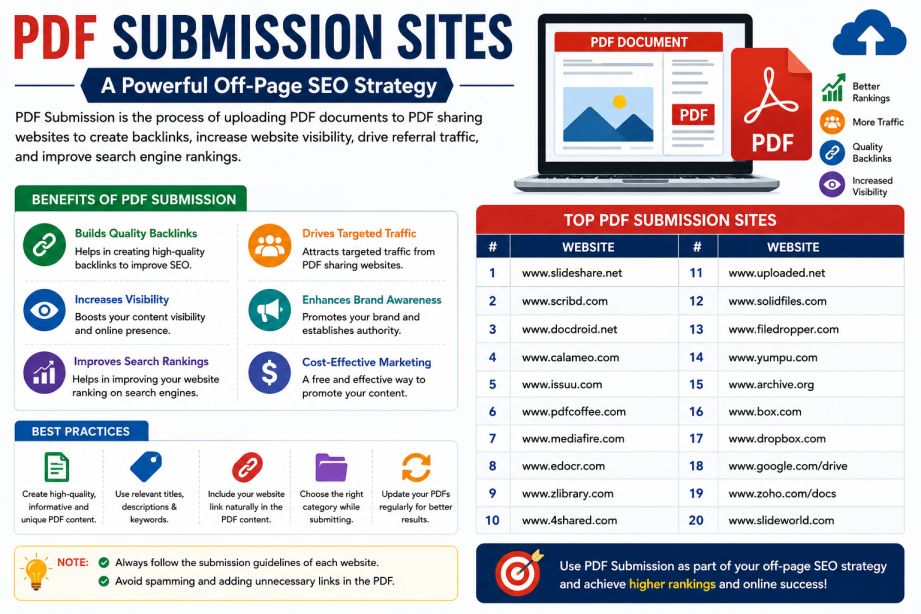
Looking for a simple yet effective way to build backlinks, increase brand visibility, and generate referral traffic? PDF submission remains one of the most overlooked off-page SEO techniques that still delivers results in 2026.
By uploading valuable PDF documents to trusted document-sharing platforms, you can earn backlinks, improve content reach, and attract highly targeted visitors to your website. Whether you’re publishing guides, case studies, reports, whitepapers, templates, or eBooks, PDF submission sites provide another channel to distribute content and strengthen your SEO strategy.
In this guide, you’ll discover the benefits of PDF submission, best practices for maximizing results, and a curated list of high-authority PDF submission sites worth using in 2026.
Table of Contents
- What Is PDF Submission in SEO?
- Benefits of PDF Submission Sites
- How PDF Submission Helps SEO
- Best Practices for PDF Submission
- Top 50+ Free PDF Submission Sites for 2026
- Common PDF Submission Mistakes
- Frequently Asked Questions
- Conclusion
What Is PDF Submission in SEO?
PDF submission is an off-page SEO technique that involves uploading PDF documents to document-sharing websites and online repositories. These platforms allow businesses, marketers, bloggers, and organizations to share valuable content while including links back to their websites.
When properly optimized, PDF documents can:
- Generate referral traffic
- Increase brand awareness
- Support link-building efforts
- Improve content distribution
- Enhance online visibility
Many PDF-sharing platforms have high domain authority, which helps your content gain exposure more quickly than publishing solely on your own website.
Benefits of PDF Submission Sites
1. Build High-Quality Backlinks
Many PDF submission platforms allow website URLs within the document, author profile, or document description.
These links can contribute to a stronger backlink profile and support overall SEO performance.
2. Increase Referral Traffic
Users who discover your PDF through search engines or platform searches may click through to your website for additional information.
3. Improve Brand Visibility
Publishing documents across multiple authoritative platforms expands your digital footprint and introduces your brand to new audiences.
4. Repurpose Existing Content
Instead of creating new content from scratch, you can convert:
- Blog posts
- Case studies
- Whitepapers
- Research reports
- Checklists
- Templates
into downloadable PDFs.
5. Strengthen Content Marketing Efforts
PDFs allow you to distribute educational resources in a format that users can easily save, share, and reference later.
6. Diversify Your Off-Page SEO Profile
Combining PDF submissions with other off-page strategies such as guest posting, social bookmarking, directory submissions, and PPT submissions creates a more natural backlink profile.
How PDF Submission Helps SEO
PDF submission supports SEO in several ways:
Authority Signals
Documents hosted on trusted websites can strengthen your brand’s online presence and improve credibility.
Search Engine Indexing
Many PDF-sharing platforms are crawled frequently by search engines, helping documents get indexed quickly.
Additional Search Visibility
Optimized PDFs can rank independently in search results, creating more opportunities for visibility.
Long-Term Traffic Potential
Unlike social media posts that quickly disappear from feeds, PDFs often remain accessible and continue generating traffic over time.
Best Practices for PDF Submission Success
Create Valuable Content
The most successful PDFs provide genuine value.
Popular formats include:
- Checklists
- Industry reports
- Research papers
- Templates
- How-to guides
- Case studies
Optimize Your File Name
Use descriptive file names that include your target keyword.
Example:
digital-marketing-strategy-guide-2026.pdf
Instead of:
final-document.pdf
Add Strategic Backlinks
Include links naturally within:
- Introduction sections
- Resource pages
- Call-to-action sections
- Reference areas
Avoid excessive linking.
Write an SEO-Friendly Title
Use clear titles that include relevant keywords while remaining natural and readable.
Optimize the PDF Description
Most platforms allow descriptions.
Include:
- Primary keyword
- Brief summary
- Website URL
- Call-to-action
Compress File Size
Smaller PDF files load faster and provide a better user experience.
Use Professional Design
Well-designed PDFs with clean layouts, graphics, and readable typography perform significantly better than plain documents.
Track Performance
Add UTM parameters to links so you can monitor traffic and conversions through analytics tools.
Top Free PDF Submission Sites for SEO in 2026
High-Authority PDF Submission Platforms
| Platform | Best For |
|---|---|
| Scribd | Documents, Guides, eBooks |
| Issuu | Digital Publications |
| Academia.edu | Academic Content |
| ResearchGate | Research Papers |
| Calaméo | Interactive Documents |
| DocDroid | Public PDF Sharing |
| Archive.org | Long-Term Content Storage |
| Figshare | Research and Data |
| Edocr | Business Documents |
| Yumpu | Digital Publishing |
Additional PDF Sharing Sites
| Platform | Type |
| PDFHost.io | PDF Hosting |
| AuthorSTREAM | Presentation & Document Sharing |
| 4Shared | File Sharing |
| MediaFire | File Hosting |
| Box Public Sharing | Cloud Document Hosting |
| Google Drive Public Files | Public Document Access |
| OneDrive Public Sharing | File Distribution |
| Zoho WorkDrive | Business Documents |
| AnyFlip | Flipbook PDFs |
| FlipHTML5 | Interactive PDF Publishing |
| Flipsnack | Digital Publications |
| PubHTML5 | Online Flipbooks |
| KeepandShare | File Sharing |
| Free-eBooks.net | eBook Distribution |
| Smashwords | Digital Publications |
Common PDF Submission Mistakes to Avoid
Keyword Stuffing
Overusing keywords in titles and descriptions can make content look spammy and reduce user engagement.
Uploading Low-Quality PDFs
Documents with poor formatting, broken links, or blurry images create a negative impression.
Using Spammy Platforms
Avoid low-quality websites that exist solely for link-building purposes.
Publishing Duplicate Content Everywhere
Instead, make small adjustments to titles, descriptions, and introductions across different platforms.
Ignoring Analytics
Without tracking performance, it’s impossible to know which platforms generate the best results.
Frequently Asked Questions
Are PDF submission sites free?
Most PDF-sharing platforms offer free plans, although some provide premium features such as analytics, branding options, or increased storage limits.
Do PDF submissions help SEO?
Yes. PDF submissions can support SEO by generating referral traffic, increasing content visibility, and contributing to a diverse backlink profile.
Can PDF files rank on Google?
Absolutely. Search engines can index PDF documents, and optimized PDFs often appear in search results for relevant keywords.
What type of PDF content performs best?
Practical resources such as guides, templates, checklists, case studies, research reports, and educational content generally perform the best.
How many PDF submission sites should I use?
Start with 5–10 reputable platforms and expand gradually based on performance and available content.
Conclusion
PDF submission remains a valuable off-page SEO strategy in 2026. By publishing useful documents on high-authority platforms, businesses can earn quality backlinks, improve brand visibility, attract referral traffic, and strengthen their overall content marketing efforts.
The key to success is focusing on quality rather than quantity. Create helpful resources, optimize every document properly, submit them to trusted platforms, and monitor performance regularly. When combined with other SEO techniques, PDF submissions can become a powerful contributor to long-term search engine growth and online authority.