
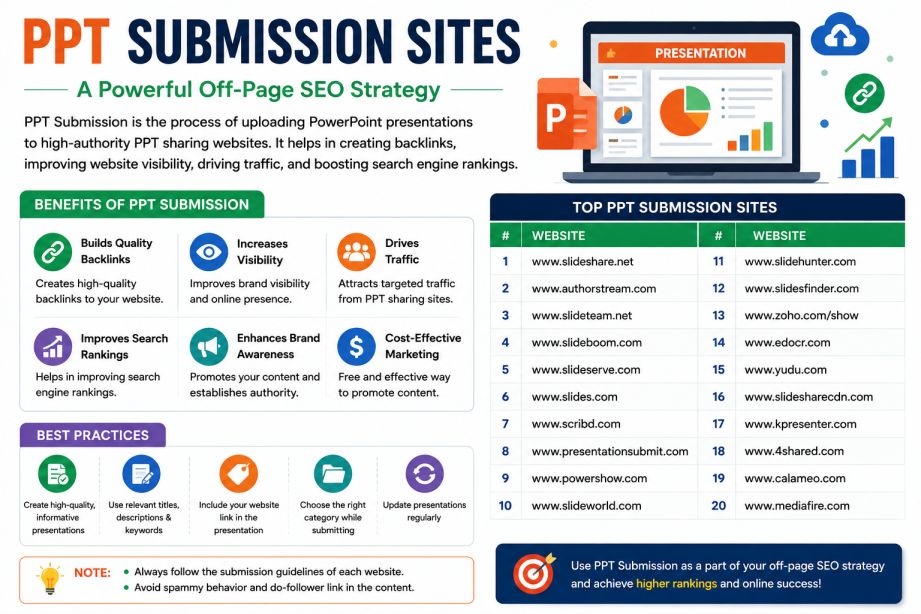
Building quality backlinks remains one of the most important parts of off-page SEO. While many marketers focus on guest posting, directory submissions, and social bookmarking, PPT submission sites continue to be an underrated strategy for generating backlinks, referral traffic, and brand visibility.
Presentation-sharing platforms allow users to upload PowerPoint presentations and share valuable information with a wider audience. These platforms often provide opportunities to include website links in descriptions, profiles, and presentation slides, making them useful for link-building campaigns.
In this guide, you’ll learn how PPT submission works, why it matters for SEO, how to choose the right platforms, and which PPT submission sites are worth using in 2025.
Table of Contents
- What Are PPT Submission Sites?
- Why PPT Submission Matters for SEO
- Key Benefits of PPT Submission
- How to Choose the Best PPT Submission Websites
- Top PPT Submission Sites List for 2025
- Step-by-Step PPT Submission Process
- PPT SEO Optimization Tips
- Common Mistakes to Avoid
- Frequently Asked Questions
- Conclusion
What Are PPT Submission Sites?
PPT submission sites are online platforms where users can upload, publish, and share PowerPoint presentations with others.
These websites help businesses, bloggers, marketers, educators, and organizations distribute content in a visually engaging format while creating opportunities to earn backlinks and attract targeted visitors.
Popular platforms include SlideShare, Scribd, Issuu, Speaker Deck, and Academia.edu.
Unlike traditional blog posts, presentations allow users to consume information quickly through visuals, charts, and concise content, which often increases engagement and sharing.
Why PPT Submission Matters for SEO in 2025
Search engines continue to value brand mentions, content distribution, and quality backlinks. PPT submission supports all three.
When presentations are uploaded to trusted websites, they can:
- Increase website authority
- Generate referral traffic
- Improve online visibility
- Support content marketing efforts
- Create additional backlink opportunities
Even when a platform provides nofollow links, the exposure and referral traffic can still contribute to your overall digital marketing strategy.
A well-designed presentation can continue attracting visitors months or even years after publication.
Key Benefits of PPT Submission
1. Quality Backlinks
Many presentation-sharing websites allow website links within descriptions, profiles, or presentation slides.
These links can help strengthen your backlink profile and improve your website’s authority over time.
2. Increased Referral Traffic
Presentations often attract highly targeted audiences interested in specific topics.
If your slides provide useful information and include relevant calls-to-action, users may visit your website to learn more.
3. Better Brand Visibility
Publishing presentations across multiple platforms increases your online footprint and helps more people discover your business.
4. Content Repurposing Opportunities
Instead of creating entirely new content, you can convert existing blog posts, case studies, reports, and guides into presentations.
5. Improved Search Engine Presence
Many PPT-sharing websites have strong domain authority, allowing presentations to rank in search results for relevant keywords.
6. Enhanced Audience Engagement
Visual content often performs better than text-only content because it is easier to consume and share.
How to Choose the Best PPT Submission Websites
Not every PPT submission platform offers the same value. Before uploading your presentations, evaluate each website carefully.
Check Domain Authority
Choose websites with strong authority and a positive reputation.
Higher-authority websites generally provide greater SEO benefits and visibility.
Review Traffic and User Activity
Platforms with active audiences are more likely to generate referral traffic and engagement.
Understand Link Policies
Some websites provide dofollow links, while others use nofollow attributes.
Both can be useful, but understanding the difference helps set realistic expectations.
Consider Niche Relevance
Industry-specific platforms often perform better than generic submission websites because they attract a more targeted audience.
Evaluate User Experience
Choose platforms with:
- Easy upload processes
- Good presentation quality
- Mobile-friendly viewing
- Clear submission guidelines
Top PPT Submission Sites for Backlinks in 2025
High-Authority PPT Submission Sites
| Platform | Best For |
|---|---|
| SlideShare | Business, Marketing, Education |
| Scribd | Documents and Presentations |
| Issuu | Digital Publications |
| Academia.edu | Academic Content |
| ResearchGate | Research and Scientific Content |
| Speaker Deck | Professional Presentations |
| Calaméo | Interactive Publications |
| Zenodo | Research and Open Access Content |
| Figshare | Data and Research Sharing |
| Prezi | Visual Presentations |
Free PPT Submission Sites
| Platform | Type |
| SlideServe | Presentation Sharing |
| PowerShow | Business Presentations |
| SlideOnline | PPT Uploads |
| AuthorSTREAM | Presentation Hosting |
| 4shared | File Sharing |
| Yumpu | Digital Publishing |
| AnyFlip | Flipbook Creation |
| FlipHTML5 | Interactive Presentations |
| DocDroid | Document Hosting |
| Canva Public Presentations | Visual Content Sharing |
Step-by-Step PPT Submission Process
Step 1: Create a Valuable Presentation
Develop a presentation that solves a problem, teaches a concept, or provides actionable insights.
Aim for:
- Clear structure
- Attractive design
- Concise content
- Actionable information
Step 2: Optimize the File Name
Use keyword-rich file names.
Example:
seo-backlink-strategy-2025.pptx
instead of
presentation-final.pptx
Step 3: Add Website Links
Include your website URL:
- On the first slide
- Within relevant slides
- On the final call-to-action slide
Step 4: Write an SEO-Friendly Title
Use target keywords naturally.
Example:
“The Ultimate SEO Backlink Building Strategy for 2025”
Step 5: Create a Compelling Description
Your description should include:
- Primary keyword
- Summary of the presentation
- Website URL
- Call-to-action
Step 6: Add Relevant Tags
Tags help users and search engines understand your content.
Use:
- Main keyword
- Related keywords
- Industry-specific terms
Step 7: Publish and Promote
After uploading:
- Share on LinkedIn
- Post on X (Twitter)
- Include in newsletters
- Embed on relevant blog posts
This increases visibility and engagement.
PPT SEO Optimization Tips
To maximize results from PPT submissions:
Use Keywords Naturally
Include target keywords in:
- File names
- Titles
- Descriptions
- Slide headings
Create Clickable CTAs
Guide users toward:
- Your website
- Lead magnets
- Case studies
- Contact forms
Keep Branding Consistent
Use consistent:
- Logos
- Colors
- Fonts
- Messaging
Focus on Visual Quality
Presentations with charts, screenshots, and graphics often generate higher engagement than text-heavy slides.
Track Performance
Use UTM parameters to measure:
- Traffic
- Conversions
- Referral sources
This helps identify which platforms produce the best results.
Common Mistakes to Avoid
Many marketers fail to see results because they make avoidable mistakes.
Avoid Duplicate Presentations
Do not upload identical presentations everywhere without making minor adjustments.
Ignore Low-Quality Platforms
Publishing on spammy websites can dilute your SEO efforts.
Don’t Overload Slides With Links
Too many links make presentations look promotional and reduce user trust.
Neglect Design Quality
Poorly designed presentations receive fewer views and shares.
Forget About Promotion
Uploading content alone isn’t enough. Promote your presentations through multiple channels.
Frequently Asked Questions
Do PPT submission sites help SEO?
Yes. PPT submission sites can generate backlinks, referral traffic, brand mentions, and additional visibility that supports SEO efforts.
Are PPT backlinks dofollow?
It depends on the platform. Some provide dofollow links, while others use nofollow attributes.
Are PPT submission sites free?
Many platforms offer free plans, although premium features may require a subscription.
How many PPT submission sites should I use?
Start with three to five high-quality platforms and expand based on performance.
Can presentations rank on Google?
Yes. Optimized presentations on authoritative websites can rank for relevant keywords and drive organic traffic.
Conclusion
PPT submission remains one of the most effective yet underutilized off-page SEO techniques in 2025. By converting valuable content into presentations and distributing them through trusted platforms, businesses can build backlinks, improve brand visibility, and attract targeted visitors.
Rather than uploading presentations everywhere, focus on quality platforms, create useful content, optimize every submission, and track performance. Consistent effort on high-authority PPT submission sites can deliver long-term SEO benefits and strengthen your overall digital marketing strategy.
| Sr. No | PPT Submission Sites | DA (Domain Authority) |
| 1 | www.slideshare.net | 95 |
| 2 | www.rapidshare.com | 95 |
| 3 | www.issuu.com | 95 |
| 4 | www.slide.com | 95 |
| 5 | www.smashwords.com | 95 |
| 6 | www.animoto.com | 95 |
| 7 | www.vcasmo.com | 95 |
| 8 | www.divshare.com | 95 |
| 9 | www.badongo.com | 95 |
| 10 | www.gamefront.com | 95 |
| 11 | www.esnips.com | 95 |
| 12 | www.scribd.com | 94 |
| 13 | www.mediafire.com | 94 |
| 14 | www.issuu.com | 94 |
| 15 | www.4shared.com | 94 |
| 16 | www.wattpad.com | 94 |
| 17 | www.zippyshare.com | 94 |
| 18 | www.academia.edu | 94 |
| 19 | www.slideworld.com | 94 |
| 20 | www.zentation.com | 94 |
| 21 | www.ioffer.com | 94 |
| 22 | www.isohunt.com | 94 |
| 23 | www.box.com | 93 |
| 24 | www.4shared.com | 93 |
| 25 | www.depositfiles.com | 93 |
| 26 | www.sendspace.com | 93 |
| 27 | www.en.calameo.com | 93 |
| 28 | www.sendspace.com | 93 |
| 29 | www.emaze.com | 93 |
| 30 | www.letitbit.net | 93 |
| 31 | www.blogs.findermaster.com | 93 |
| 32 | www.megafileupload.com | 93 |
| 33 | www.docstoc.com | 93 |
| 34 | www.filestube.com | 93 |
| 35 | www.officelive.com | 93 |
| 36 | www.mininova.org | 93 |
| 37 | www.gigasize.com | 93 |
| 38 | www.wattpad.com | 92 |
| 39 | www.filefactory.com | 92 |
| 40 | www.slideshare.net | 92 |
| 41 | www.mediafire.com | 92 |
| 42 | www.2shared.com | 92 |
| 43 | www.visual.ly | 92 |
| 44 | www.filefactory.com | 92 |
| 45 | www.sharepresentation.com | 92 |
| 46 | www.mirrorcreator.com | 92 |
| 47 | www.feedbooks.com | 92 |
| 48 | www.filecloud.io | 92 |
| 49 | www.free-ebooks.net | 92 |
| 50 | www.ziddu.com | 91 |
| 51 | www.yumpu.com | 91 |
| 52 | www.docdroid.net | 91 |
| 53 | www.article.advertiseera.com | 91 |
| 54 | www.story.wallclassifieds.com | 91 |
| 55 | www.ifile.it | 91 |
| 56 | www.yudu.com | 91 |
| 57 | www.uploading.com | 90 |
| 58 | www.visual.ly | 90 |
| 59 | www.crocko.com | 90 |
| 60 | www.thinkfree.com | 90 |
| 61 | www.manybooks.net | 90 |
| 62 | www.diigo.com | 89 |
| 63 | www.smashwords.com | 89 |
| 64 | www.keepandshare.com | 89 |
| 65 | www.freepdfhosting.com | 89 |
| 66 | www.pdfescape.com | 89 |
| 67 | www.gofile.io | 89 |
| 68 | www.sliderocket.com | 89 |
| 69 | www.paperbackswap.com | 88 |
| 70 | www.trendyread.com | 87 |
| 71 | www.filestube.com | 87 |
| 72 | www.article.classifiedsfactor.com | 87 |
| 73 | www.pdfcast.org | 87 |
| 74 | www.freepdfhosting.com | 87 |
| 75 | www.authorstream.com | 86 |
| 76 | www.pdf-archive.com | 86 |
| 77 | www.wikiupload.com | 86 |
| 78 | www.presentationpro.com | 86 |
| 79 | www.senduit.com | 86 |
| 80 | www.gigabox.com | 86 |
| 81 | www.animoto.com | 86 |
| 82 | www.slideboom.com | 86 |
| 83 | www.en.pdf24.org | 86 |
| 84 | www.tizag.com | 85 |
| 85 | www.zentation.com | 85 |
| 86 | www.mirrorcreator.com | 85 |
| 87 | www.freecomputerbooks.com | 85 |
| 88 | www.docslide.us | 85 |
| 89 | www.turboupload.com | 85 |
| 90 | www.zoho.com | 84 |
| 91 | www.slideserve.com | 84 |
| 92 | www.edocr.com | 84 |
| 93 | www.hdoxtop.com | 84 |
| 94 | www.reddit.com | 84 |
| 95 | www.280slides.com | 84 |
| 96 | www.huddle.net | 84 |
| 97 | www.uploadingit.com | 84 |
| 98 | www.wikiupload.com | 83 |
| 99 | www.zshare.net | 82 |
| 100 | www.dochub.com | 82 |
List of Top 50+ PPT Submission Websites in 2026
| Sr. No | PPT Submission Sites | DA (Domain Authority) |
| 1 | www.slideworld.com | 82 |
| 2 | www.senduit.com | 82 |
| 3 | www.yourfilelink.com | 82 |
| 4 | www.bigupload.com | 82 |
| 5 | www.pdfhost.net | 80 |
| 6 | www.glasscubes.com | 80 |
| 7 | www.snipfiles.com | 80 |
| 8 | www.brainshark.com | 80 |
| 9 | www.blog.freeadstime.org | 80 |
| 10 | www.ologames.com | 80 |
| 11 | www.examcollection.com | 80 |
| 12 | www.freecomputerbooks.com | 80 |
| 13 | www.e-library.net | 80 |
| 14 | www.torrentportal.com | 80 |
| 15 | www.slideonline.com | 79 |
| 16 | www.en.calameo.com | 79 |
| 17 | www.present.me | 79 |
| 18 | www.pinpdf.com | 78 |
| 19 | www.knowfree.net | 78 |
| 20 | www.edocr.com | 78 |
| 21 | www.present.me | 78 |
| 22 | www.slingfile.com | 78 |
| 23 | www.myplick.com | 78 |
| 24 | www.blog.shopolop.com | 77 |
| 25 | www.host-a.net | 77 |
| 26 | www.bitroad.net | 77 |
| 27 | www.slideshop.com | 77 |
| 28 | www.prezentit.com | 77 |
| 29 | www.libraryelf.com | 76 |
| 30 | www.glasscubes.com | 76 |
| 31 | www.wepapers.com | 76 |
| 32 | www.files.com | 76 |
| 33 | www.knowfree.net | 76 |
| 34 | www.files.com | 75 |
| 35 | www.leokrut.com | 75 |
| 36 | www.powershow.com | 74 |
| 37 | www.libraryelf.com | 74 |
| 38 | www.authorstream.com | 73 |
| 39 | www.midupload.com | 73 |
| 40 | www.doxtop.com | 72 |
| 41 | www.gazhoo.com | 72 |
| 42 | www.worldranklist.com | 70 |
| 43 | www.wisdomebooks.com | 70 |
| 44 | www.scribd.com | 69 |
| 45 | www.doocu.co | 69 |
| 46 | www.wupload.in | 69 |
| 47 | www.gazhoo.com | 68 |
| 48 | www.ziddu.com | 68 |
| 49 | www.persianupload.net | 68 |
| 50 | www.ebooks-uk.com | 68 |
List of Top 50+ PPT Submission Sites in 2026
| Sr. No | PPT Submission Sites | DA (Domain Authority) |
| 1 | www.bookswealth.com | 68 |
| 2 | www.crocko.com | 67 |
| 3 | www.slidefinder.net | 67 |
| 4 | www.blog.giganticlist.com | 65 |
| 5 | www.brainshark.com | 65 |
| 6 | www.zoho.com | 62 |
| 7 | www.emaze.com | 62 |
| 8 | www.articles.h1ad.com | 62 |
| 9 | www.sliderocket.com | 62 |
| 10 | www.slideworld.org | 62 |
| 11 | www.beyondbulletpoints.com | 62 |
| 12 | www.empressr.com | 62 |
| 13 | www.lulu.com | 61 |
| 14 | www.sharepresentation.com | 61 |
| 15 | www.speaking.alltop.com | 61 |
| 16 | www.filedropper.com | 60 |
| 17 | www.keepandshare.com | 60 |
| 18 | www.presentationload.de | 60 |
| 19 | www.presentermedia.com | 60 |
| 20 | www.slides.diigo.com | 59 |
| 21 | www.gamefront.com | 58 |
| 22 | www.slides.com | 58 |
| 23 | www.turbobit.net | 56 |
| 24 | www.speakerdeck.com | 54 |
| 25 | www.mirrored.to | 53 |
| 26 | www.easy-share.com | 51 |
| 27 | www.transferbigfiles.com | 50 |
| 28 | www.slides.com | 50 |
| 29 | www.uploading.com | 48 |
| 30 | www.slideserve.com | 48 |
| 31 | www.2shared.com | 46 |
| 32 | www.yudu.com | 45 |
| 33 | www.m62.net | 41 |
| 34 | www.bebee.com | 40 |
| 35 | www.awaysomearticle.com | 39 |
| 36 | www.storeboard.com | 37 |
| 37 | www.rapidshare.de | 36 |
| 38 | www.powershow.com | 28 |
| 39 | www.box.net | 27 |
| 40 | www.lulu.com | 24 |
| 41 | www.uploaded.to | 23 |
| 42 | www.theblogarena.com | 22 |
| 43 | www.howcube.com | 22 |
| 44 | www.fileden.com | 22 |
| 45 | www.pearltrees.com | 21 |
| 46 | www.presentationpro.com | 21 |
| 47 | www.datafilehost.com | 20 |
| 48 | www.uploadarticle.com | 19 |
| 49 | www.hotfile.com | 19 |
| 50 | www.bloggersroad.com | 17 |